I grow social accounts for a living. Six years in, I know exactly which parts of that job are judgment and which parts are just hours. The judgment stays with me. The hours became these.
Some of these run social media. Some run a business that never had software before. They come from the same habit: watch where the time actually goes, then build the thing that takes it back.
Two rules on this page. Client tools stay the client's property, and I name no client here. Every screen below runs on invented data, so nothing you see belongs to anyone real.
Content and social systems
Built for the work I already do by hand, so it stops being done by hand.
Content Multiplier
Content pipeline
The problem it solves is boring and expensive: a founder sits for one video a week, and turning that into a week of posts across five platforms takes a person two full days. Every week. Forever.
So the transcript goes in and the week comes out. Captions per platform per cut, LinkedIn posts, quote cards rendered as finished images, a newsletter with its banner, carousels, one-pagers, and a full YouTube package with titles, chapters and thumbnails. Everything lands on a posting calendar rather than in a folder someone has to open.
The interesting engineering is not the writing. It's the part that assumes the model will misbehave. A parser that expects the output to be malformed and fixes it. Length caps per platform. Automatic re-rolls when a piece comes back wrong. A publish hold that stops anything questionable before it reaches a real feed. The voice profile is cached as a single prefix, which is what makes running it every week cost pocket change instead of a salary.
What goes in
One video transcript
What comes out
Captions for five platforms
LinkedIn posts
Quote cards as images
A newsletter and banner
Carousels and one-pagers
YouTube titles, chapters, thumbnails
A filled posting calendar
The operator screen. Drop the transcript, pick the week, run it.
Built with Node and Express, the Anthropic API, headless-browser rendering for the image pieces, and a scheduler that publishes on a collision-free calendar.
Status Running daily as a client's production system. I built it and I maintain it; the tool is theirs.
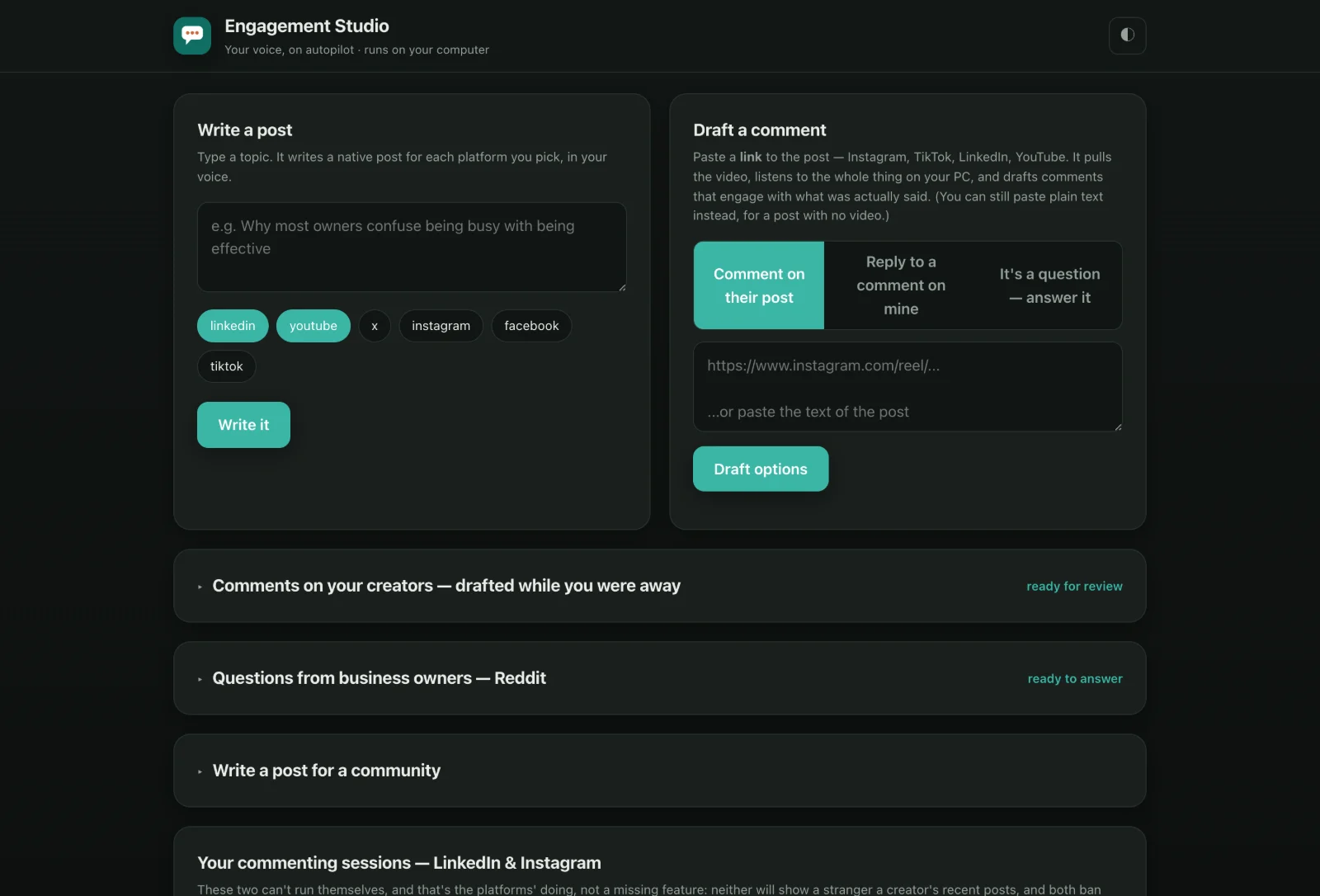
Commenting under the right people is how a small account gets found. It also quietly eats an hour a day, which is why almost nobody keeps it up past week three.
This watches the creators you care about, reads what they actually posted (it will pull a video and listen to it rather than guess from a caption), and drafts comments in your voice. They stack up in a review queue. You skim, edit anything that's off, and send.
The design decision worth understanding: it never presses Post. The browser extension fills the box and a person sends it. It reads posts the way any signed-out visitor does, never through your login session, and it makes no attempt to look like something it isn't. Platforms restrict accounts for automated activity, and both of the enforcement waves I've watched went straight at logged-in automation and comment volume. So the automation stops at the draft. You keep the click, and there is nothing on the account to flag.
Replies to comments on your own posts run through official integrations, with caps, spacing and quiet hours. Anything that looks like a question, a complaint or a lead is held back for you instead of answered automatically. Private messages are never answered by the system at all.
What goes in
The creators you want to be seen under
Your own posts
What comes out
Comments drafted in your voice
Replies to your commenters
Answers to questions in your niche
A review queue
A schedule that nudges you
The daily screen. Everything drafted, nothing sent, until you send it.
Built with Python, the Anthropic API, a browser extension, local speech-to-text for reading video posts, and official platform integrations.
Status Live and in daily use on a client's accounts. I built it and I maintain it; the tool is theirs.
Motion graphics, written as code
Video production system
Motion graphics are the usual bottleneck in a content operation. One designer, a queue, a week of turnaround, and a look that drifts every time somebody new touches it.
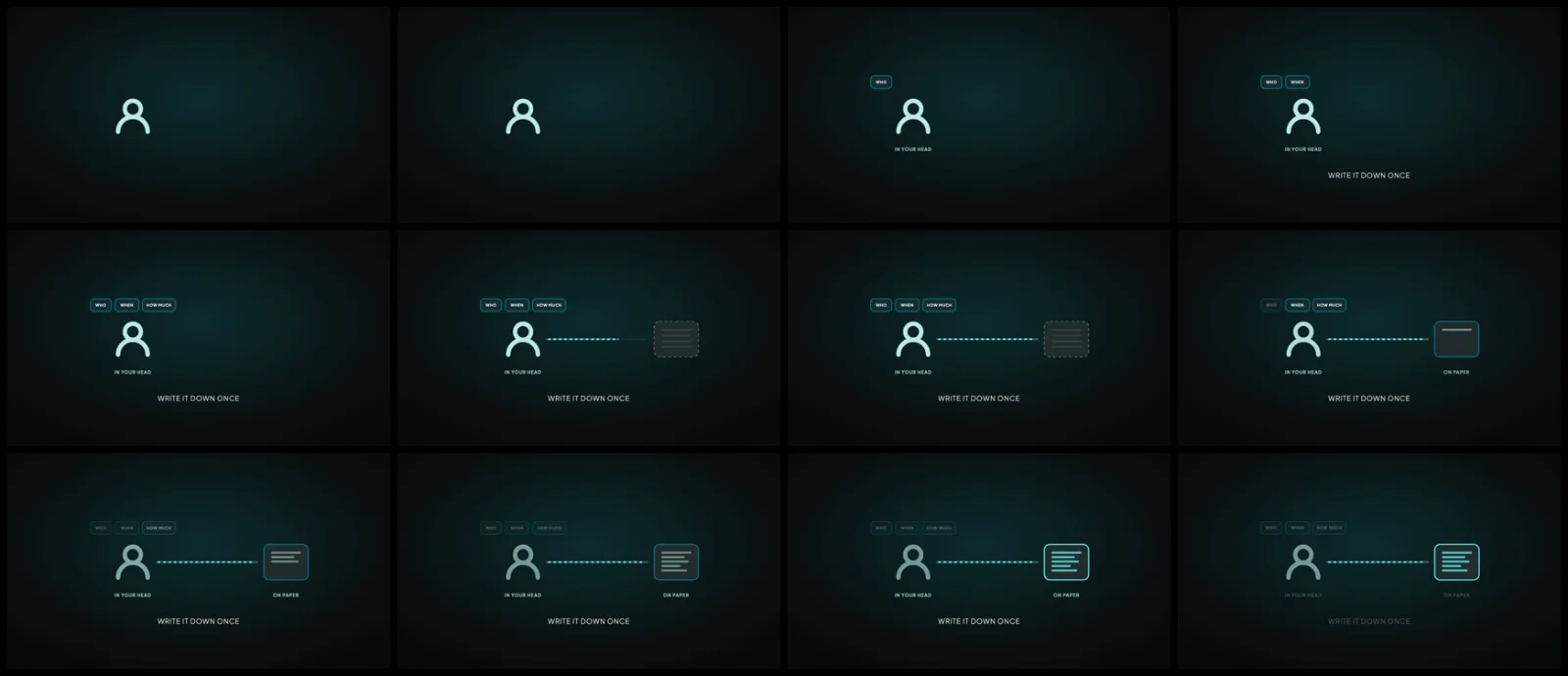
These shots are React components rendered to video, which changes what a house style even is. Type scale, palette, spacing, timing, the minimum frames a caption has to stay on screen: those stop being a habit somebody remembers and become rules in a file. A shot that breaks one fails its check instead of quietly shipping. Every animated shot carries its own sound bed, storyboards as a still first, and renders a small draft before anything goes to full resolution.
The harder half is moving it. What makes an AI workflow good is almost never in the project folder. It's the accumulated rules, the memory of every correction, the exact tool versions, the environment. Copy the files to a teammate and you move none of that, which is why handing over a folder never works. So I built the kit that captures the rest: it reads the setup's own state, interviews the person using it for what only lives in their head, writes all of it into plain files any machine can read, then installs on the new machine and refuses to pass until three sample frames match the reference.
What goes in
A voiceover line and its timecodes
The shot type
What comes out
An animated shot on the locked style
Timed to the words
Its own sound bed
A 720p draft, then 4K
Checked against the spec before delivery
One shot, twelve frames, in order. The contact sheet is how a render gets checked before it ships.
Built with Remotion and React, rendered locally through ffmpeg on a version-pinned toolchain.
What it costs to run No render fees and no per-seat cost. The framework is free for individuals and for teams of up to three people, and needs a paid company licence above that, so for a solo creator or a small team the running cost is the electricity.
Status Producing finished shots. The transfer kit is written and waiting on its first install.
Business systems
The same approach pointed at businesses that still run on paper, a notebook, or somebody's memory.
Offer Builder with checks
Sample build for coaching businesses
A coach fills in her business profile once: who she helps, what she sells, her price range, her credential, the testimonials she has permission to use. The builder writes her first group offer from that profile and nothing else.
Then code checks every claim before the offer is kept. The price has to sit inside her range. The credential has to match what she holds, word for word, so a certification never turns into a licence. The testimonial has to be one she actually got. Cure and guarantee claims are blocked outright. If a draft fails, it goes back once with the failures named, and nothing reaches a client until it passes.
What goes in
One business profile
What comes out
A first group offer in her words
Eight check results, pass or fail
Three next steps, each tied to her profile
Built with Node and the Anthropic API, with structured output and the checks written as plain code with tests.
A paediatric clinic with three sites and around thirteen thousand paper charts. Nobody is going to stop seeing patients to type those in, and no amount of good software fixes a backlog that big by asking staff to retype it.
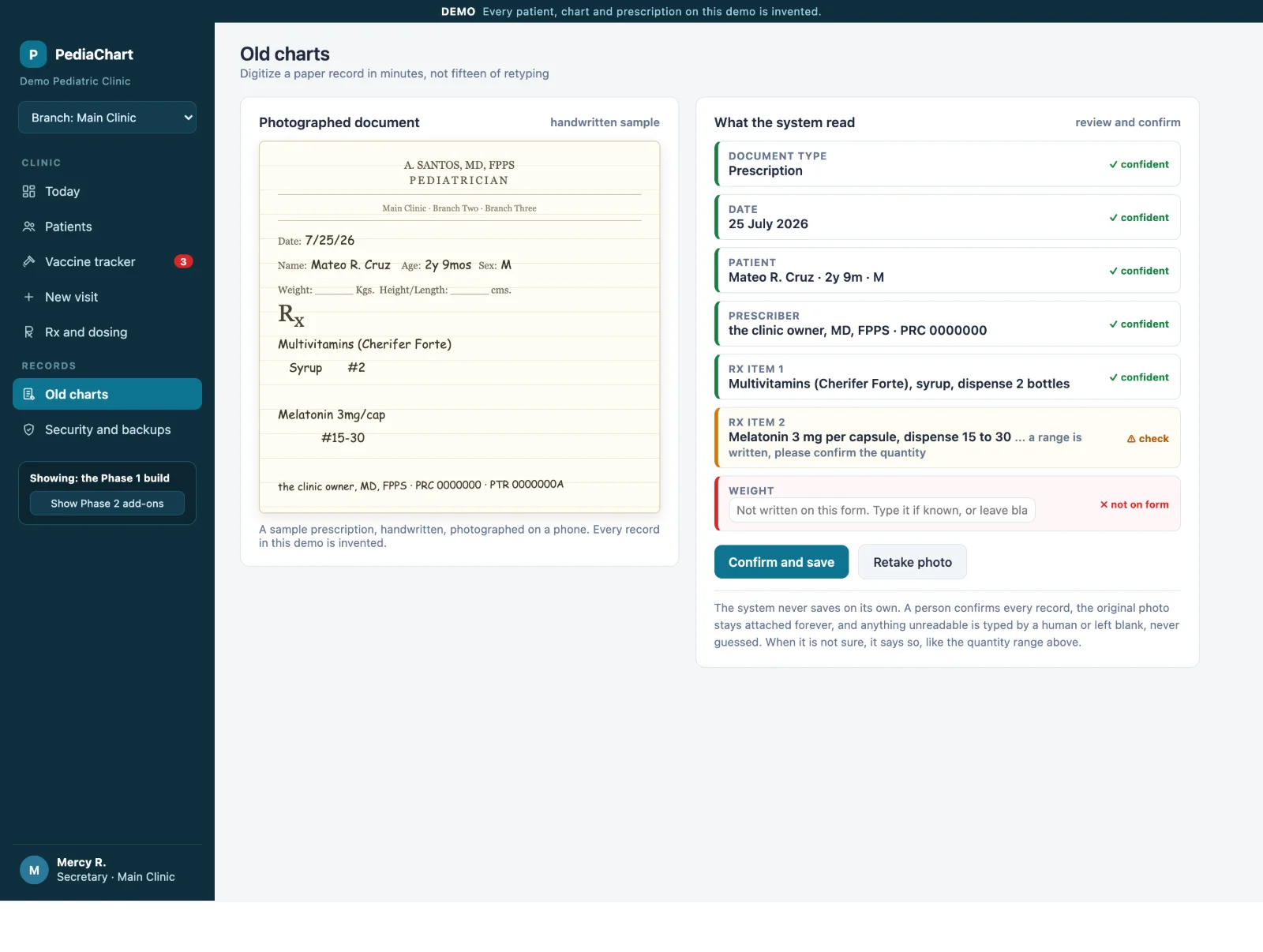
So the phone does the reading. Photograph a chart, and the fields come back marked by how sure the system is: green where it is confident, amber where a human needs to look, red where the form was blank. Nothing saves on its own. A person confirms every record, and the original photograph stays attached to it forever.
The test that convinced me it was worth building used a real handwritten prescription. It came back correct in one pass. The one ambiguous item, a quantity written as a range, was flagged for confirmation rather than guessed at. The weight field, blank on the paper, stayed blank on the screen. That last part matters more than accuracy: a records system that invents a plausible number is worse than no system.
Around it sits the ordinary but necessary work. Growth curves on the standard percentiles, a vaccine register with dose calculations, per-person logins with real role limits, an access log the clinic owns, encrypted nightly backups, and short-lived links on private storage.
What goes in
A phone photo of a paper chart
What comes out
A structured patient record
Every field marked by confidence
Unclear items flagged for a human
Missing items left blank, never guessed
The original photo kept, attached
Photograph on the left, what the system read on the right, and the flag on anything it will not guess. Invented patient.
Built with a Vite single-page app on Cloudflare, Postgres in the Singapore region, and the Anthropic API for the read. Access logging, role limits and encrypted backups are part of the build rather than an add-on.
Status Demonstrated end to end and scoped. Screens here run on invented patients.
CounterBook
Counter system for a coffee shop
There is plenty of free point-of-sale software, so building one needs a reason. Here are two.
The senior citizen discount. Philippine law says the discount comes off after the sales tax is removed, not before. Every off-the-shelf tool I tested applies the twenty percent to the tax-inclusive price instead, which overcharges a senior by about forty-three pesos on a five hundred peso bill. That is not a rounding error, it is a compliance problem the owner would carry. So the discount engine does it in the right order, and captures the identification the law requires.
The counter has to work when the internet doesn't. The register keeps its own local copy and its own outbox. Order identifiers are generated and stored on the device before any network call, so a retry reuses the order instead of creating a second one. Money is held as whole centavos, never as a decimal that drifts.
The receipt rule shapes the whole design: software that prints a customer's official invoice needs government accreditation, so this one never prints one. It prints order slips carrying the required wording, and the paperwork stays where it legally belongs.
What goes in
An order at the counter
What comes out
An order slip to the kitchen
A correct discount, in the right order
A shift count at close
A day's sales the owner can read
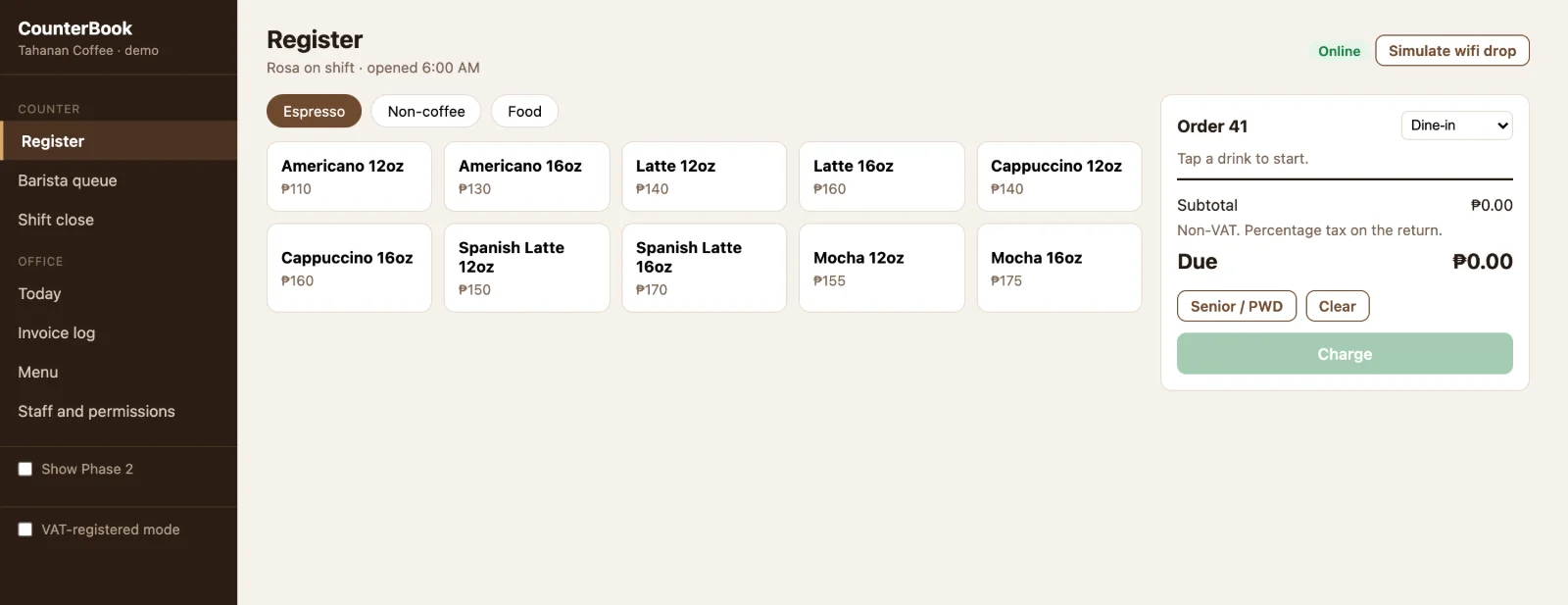
The register, on an invented shop and an invented menu.
Built with React and TypeScript on Cloudflare, Postgres, a local offline store with an idempotent outbox, and thermal printing over Bluetooth from the browser.
Status The framework is built and runs a whole sale end to end on demo data, under a passing test suite with strict typechecking. It is not live in a shop yet. Printing and payment currently run against simulated hardware.
Ops system for a water treatment business
Operations system
A supplier who installs and services water treatment equipment across two towns. The customer list lived in a notebook and a phone. The question that actually loses money is simple and nobody could answer it: which of the units we installed are due for a filter change this month?
So the system is built around installed equipment rather than around invoices. Every customer carries the units they own and the service intervals those units need, which turns maintenance from something remembered into something scheduled. Around that: quotations that print, orders with partial and unpaid balances tracked the way the business actually sells, an install pipeline, a service board, stock with low-stock flags, and a receivables view by age.
The website and the ops system are one build, not two. An enquiry from the site does not land in an inbox nobody checks. It arrives on the shop's own screen as a customer and a job, in two taps.
What goes in
An enquiry from the website
What comes out
A customer record with their equipment
A printable quotation
An install job
A service date that arrives on its own
Built with hand-written HTML, CSS and JavaScript as self-contained files, with Python build scripts for the branded and unbranded versions.
Status Demo built and reviewable. Not sold, not live. No screenshot here because the demo carries the real business's branding.
Clip pipeline
Short-form production
A long stream is mostly filler with a few genuinely good minutes inside it, and finding those by scrubbing a timeline is the least valuable way a person can spend an evening.
This one takes the recording, transcribes it, and reads the transcript for moments worth cutting, scoring each one rather than taking the first hit. It cross-checks against two signals a transcript can't see: where the audio suddenly gets louder, and where the live chat spiked. Then it renders the vertical cuts with word-level captions and a hook burned into the opening seconds, and drops them in a local gallery to review.
It runs on my own machine and my own graphics card, which is the whole point. Per-clip cost is close to nothing.
What goes in
A livestream or a long video
What comes out
Ranked candidate moments
Vertical cuts, rendered
Word-level captions
A hook on the first seconds
A review gallery
Built with a fast speech-to-text service, Claude for selecting and scoring moments, and ffmpeg for the render. Runs locally.
Status Built and proven end to end. Mine, not a client's. No screenshot: the accounts it feeds are kept separate from this brand on purpose.
If your content is the bottleneck, that's a system problem.
Tell me how your content gets made right now, start to finish. I'll tell you which part of it should stop being done by a person, and what I'd build first.